Using Software Type to Separate Telemetry by Component
Many devices run multiple firmware components - for example, a main application MCU and a separate wireless module, or an application image and a sensor acquisition controller. Memfault's Software Type mechanism is designed to handle exactly this case: each component reports its own Software Type and Software Version, giving you clean per-component telemetry in Memfault.
Why Use Separate Software Types
When a device has distinct firmware components with independent version lifecycles, using a unique Software Type for each component provides:
-
Separate version tracking. Each component's software version appears independently in Memfault, so you can see at a glance what version of the wireless module or sensor controller is running on any given device.
-
Accurate Issue attribution. Crashes and traces are tagged with the Software Type that reported them. Using distinct Software Types means a radio crash and an application crash are tracked separately, with their own Issue histories and version distributions.
-
Cleaner metric segmentation. Heartbeat metrics and custom events are associated with the reporting Software Type, making it straightforward to compare radio metrics against application metrics without them intermingling.
Example: Bluetooth Chip and Application
An example is a device that runs separate radio and application images on two different MCUS. Both can report telemetry to Memfault independently:
| Component | Software Type | Software Version |
|---|---|---|
| Bluetooth Chip | bt | 1.2.0 |
| Application | app | 3.5.1 |
Both Software Types belong to the same device (identified by its serial number), so their data appears together on the device page. Charts and Issue views can be filtered by Software Type to focus on the component of interest.
Avoid using Software Types to distinguish build variants of the same component
(e.g. app-debug vs app-release). Encode the variant in the Software Version
string instead (e.g. 2.1.0-debug). Using separate Software Types for variants
breaks trace deduplication - identical crashes will create separate Issues
instead of being grouped together.
See the Software Type documentation for the full list of pitfalls.
Filtering Dashboards and Issues by Software Type
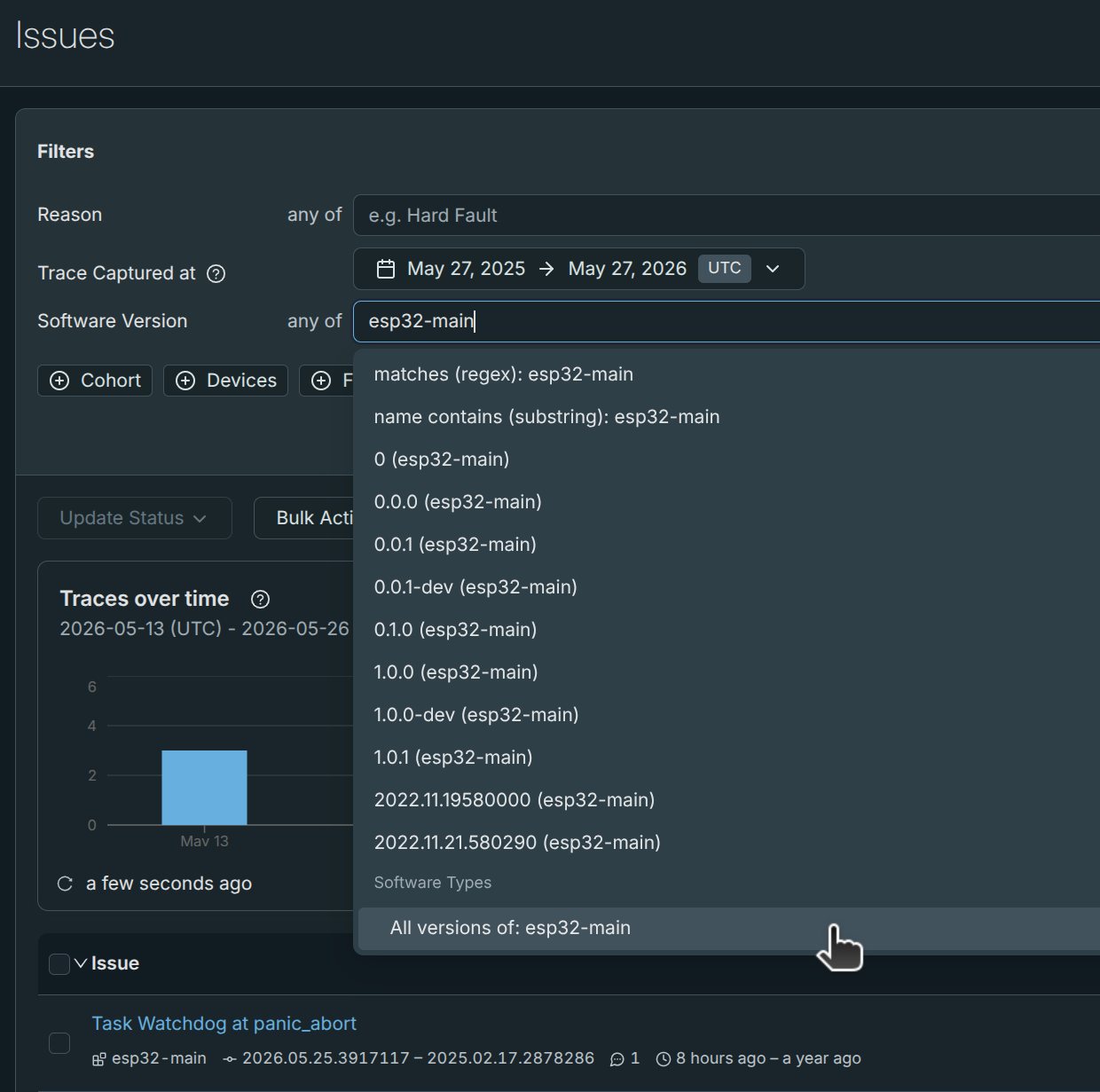
Use the Software Type filter in the dashboard and Issue views to focus on a
specific software type. Type the software type name (e.g. bt) into the filter
box, and select "All versions of..." to see all data for that software type.
Software Types and OTA
The multi-Software-Type pattern works well for telemetry, but Memfault's OTA
system is tied to the Primary Software Type for a given Hardware Version. OTA
Releases are associated with a specific Software Type, and the releases/latest
API call uses the device's reported Software Type to look up the applicable
release.
This means:
- Separate OTA deployments cannot be independently managed for each Software Type through the standard Releases UI.
- Only the Primary Software Type participates in standard OTA fleet management (cohort assignments, version distribution charts, etc.).
Recommendation for multi-component OTA: Bundle all component images into a single OTA payload associated with the Primary Software Type. The bundle is delivered to the device as one artifact, and the device is responsible for distributing the appropriate sub-image to each component. See OTA - Updating Multiple Components for details and example implementations.
If truly independent per-component OTA is required, one option is to use separate Memfault Projects - one per component - each with its own Primary Software Type and release pipeline. This trades simpler per-component version management for the overhead of managing multiple projects and cohorts in parallel.